
- Conversão de roteador Netprotection para instalação de RouterOS e configuração da Mambo.
<p data-identifyelement="464" style="box-sizing: border-box; margin-bottom: 0px; margin-left: 0px; font-size: 13px; line-height: 18px; word-break: normal; overflow-wrap: break-word; color: rgb(24, 50, 71); font-family: -apple-system, BlinkMacSystemFont, " segoe="" ui",="" roboto,="" "helvetica="" neue",="" arial,="" sans-serif;="" font-weight:="" 400;="" text-align:="" start;="" text-indent:="" 0px;"="">Pré-requisitos <ul data-identifyelement="466" style="box-sizing: border-box; margin-bottom: 4px; margin-left: 0px; padding: 0px 0px 0px 40px; line-height: 17px; list-style: disc; color: rgb(24, 50, 71); font-family: -apple-system, BlinkMacSystemFont, " segoe="" ui",="" roboto,="" "helvetica="" neue",="" arial,="" sans-serif;="" font-size:="" 13px;="" font-weight:="" 400;="" text-align:="" start;="" text-indent:="" 0px;"="">
- Roteador Mikrotik com Firmware NetProtection
- Computador com Sistema Operacional Windows (de preferência Windows 7 ou XP)
- IP estático 192.168.1.2 definido na interface LAN com máscara 255.255.255.0 e gateway 192.168.1.1 (para saber como definir clique aqui!)
- Cabo de rede CAT5 ou CAT6
- Cabo de rede com link de internet
- Software NetInstall (Clique aqui para fazer o download)
- Firmware do RouterOS (<span data-identifyelement="476" style="color: rgb(24, 50, 71); font-family: -apple-system, BlinkMacSystemFont, " segoe="" ui",="" roboto,="" "helvetica="" neue",="" arial,="" sans-serif;="" font-size:="" 13px;="" font-weight:="" 400;="" text-align:="" left;="" text-indent:="" 0px;="" display:="" inline="" !important;"="">clique <span data-identifyelement="477" style="color: rgb(61, 142, 185); font-family: -apple-system, BlinkMacSystemFont, " segoe="" ui",="" roboto,="" "helvetica="" neue",="" arial,="" sans-serif;="" font-size:="" 13px;="" font-weight:="" 400;="" text-align:="" left;="" text-indent:="" 0px;="" display:="" inline="" !important;"=""><a data-identifyelement="479" href="https://download.mikrotik.com/routeros/6.48/routeros-mipsbe-6.48.npk" style="box-sizing: border-box; color: rgb(44, 92, 197); user-select: auto; font-family: -apple-system, BlinkMacSystemFont, " segoe="" ui",="" roboto,="" "helvetica="" neue",="" arial,="" sans-serif;="" font-size:="" 13px;="" font-weight:="" 400;="" text-align:="" left;="" text-indent:="" 0px;"="">aqui <span data-identifyelement="480" style="color: rgb(24, 50, 71); font-family: -apple-system, BlinkMacSystemFont, " segoe="" ui",="" roboto,="" "helvetica="" neue",="" arial,="" sans-serif;="" font-size:="" 13px;="" font-weight:="" 400;="" text-align:="" left;="" text-indent:="" 0px;="" display:="" inline="" !important;"="">para fazer o download)
- Programa Winbox (<span data-identifyelement="476" style="color: rgb(24, 50, 71); font-family: -apple-system, BlinkMacSystemFont, " segoe="" ui",="" roboto,="" "helvetica="" neue",="" arial,="" sans-serif;="" font-size:="" 13px;="" font-weight:="" 400;="" text-align:="" left;="" text-indent:="" 0px;="" display:="" inline="" !important;"="">clique <span data-identifyelement="477" style="color: rgb(61, 142, 185); font-family: -apple-system, BlinkMacSystemFont, " segoe="" ui",="" roboto,="" "helvetica="" neue",="" arial,="" sans-serif;="" font-size:="" 13px;="" font-weight:="" 400;="" text-align:="" left;="" text-indent:="" 0px;="" display:="" inline="" !important;"=""><a data-identifyelement="479" href="https://mt.lv/winbox64" style="box-sizing: border-box; color: rgb(44, 92, 197); user-select: auto; font-family: -apple-system, BlinkMacSystemFont, " segoe="" ui",="" roboto,="" "helvetica="" neue",="" arial,="" sans-serif;="" font-size:="" 13px;="" font-weight:="" 400;="" text-align:="" left;="" text-indent:="" 0px;"="" target="_self">aqui <span data-identifyelement="480" style="color: rgb(24, 50, 71); font-family: -apple-system, BlinkMacSystemFont, " segoe="" ui",="" roboto,="" "helvetica="" neue",="" arial,="" sans-serif;="" font-size:="" 13px;="" font-weight:="" 400;="" text-align:="" left;="" text-indent:="" 0px;="" display:="" inline="" !important;"="">para fazer o download)
- Arquivo mambo.rsc (enviado em anexo por email, caso não tenha recebido, mande email para suporte@mambowifi.com)
- ATENÇÃO: DESATIVAR E DESABILITAR TODAS AS INTERFACES DO COMPUTADOR EXCETO A QUE IRÁ CONECTAR NO MIKROTIK
- DESATIVAR ANTIVÍRUS E FIREWALL DO COMPUTADOR
- USAR COMPUTADOR FORA DE DOMÍNIO DE FIREWALL (COMO ENDPOINTS POR EXEMPLO)
- SE USAR WINDOWS 10, rode o NetInstall como modo de compatibilidade para Windows 7
<p data-identifyelement="484" style="box-sizing: border-box; margin-bottom: 0px; margin-left: 0px; font-size: 13px; line-height: 18px; word-break: normal; overflow-wrap: break-word; color: rgb(24, 50, 71); font-family: -apple-system, BlinkMacSystemFont, " segoe="" ui",="" roboto,="" "helvetica="" neue",="" arial,="" sans-serif;="" font-weight:="" 400;="" text-align:="" start;="" text-indent:="" 0px;"="">Configuração <p data-identifyelement="486" style="box-sizing: border-box; margin-bottom: 0px; margin-left: 0px; font-size: 13px; line-height: 18px; word-break: normal; overflow-wrap: break-word; color: rgb(24, 50, 71); font-family: -apple-system, BlinkMacSystemFont, " segoe="" ui",="" roboto,="" "helvetica="" neue",="" arial,="" sans-serif;="" font-weight:="" 400;="" text-align:="" start;="" text-indent:="" 0px;"="">
1. Após o download do Netinstall, extraia o arquivo zip baixado e execute o netinstall.exe
2. Clique na opção Net booting e defina o campo Client IP address IP com o valor 192.168.1.1 e clique em OK.
<p data-identifyelement="497" style="box-sizing: border-box; margin-bottom: 0px; margin-left: 0px; font-size: 13px; line-height: 18px; word-break: normal; overflow-wrap: break-word; color: rgb(24, 50, 71); font-family: -apple-system, BlinkMacSystemFont, " segoe="" ui",="" roboto,="" "helvetica="" neue",="" arial,="" sans-serif;="" font-weight:="" 400;="" text-align:="" start;="" text-indent:="" 0px;"=""><span data-identifyelement="499" style="color: rgb(24, 50, 71); font-family: -apple-system, BlinkMacSystemFont, " segoe="" ui",="" roboto,="" "helvetica="" neue",="" arial,="" sans-serif;="" font-size:="" 13px;="" font-weight:="" 400;="" text-align:="" left;="" text-indent:="" 0px;="" display:="" inline="" !important;"="">

<p data-identifyelement="504" style="box-sizing: border-box; margin-bottom: 0px; margin-left: 0px; font-size: 13px; line-height: 18px; word-break: normal; overflow-wrap: break-word; color: rgb(24, 50, 71); font-family: -apple-system, BlinkMacSystemFont, " segoe="" ui",="" roboto,="" "helvetica="" neue",="" arial,="" sans-serif;="" font-weight:="" 400;="" text-align:="" start;="" text-indent:="" 0px;"="">
3. Com o Netinstall configurado você já pode fazer com que o programa reconheça o seu equipamento.
Com seu Roteador Mikrotik desconectado da fonte de energia, conectar um cabo de rede na porta Ethernet 1 e a outra ponta em seu computador.
Pressionar o botão de reset sem soltar e conectar a fonte de alimentação, mantendo o botão de reset pressionado até a sua seja identificado pelo Netinstall. (Aparecerá em sua tela, conforme imagem abaixo)

4. Clique em Browse e selecione o arquivo routeros-mipsbe-6.48.npk (Baixado no início desse tutorial). Clique em OK.
<p data-identifyelement="518" style="box-sizing: border-box; margin-bottom: 0px; margin-left: 0px; font-size: 13px; line-height: 18px; word-break: normal; overflow-wrap: break-word; color: rgb(24, 50, 71); font-family: -apple-system, BlinkMacSystemFont, " segoe="" ui",="" roboto,="" "helvetica="" neue",="" arial,="" sans-serif;="" font-weight:="" 400;="" text-align:="" start;="" text-indent:="" 0px;"=""><span data-identifyelement="520" style="color: rgb(24, 50, 71); font-family: -apple-system, BlinkMacSystemFont, " segoe="" ui",="" roboto,="" "helvetica="" neue",="" arial,="" sans-serif;="" font-size:="" 13px;="" font-weight:="" 400;="" text-align:="" left;="" text-indent:="" 0px;="" display:="" inline="" !important;"="">
 <p data-identifyelement="522" style="box-sizing: border-box; margin-bottom: 0px; margin-left: 0px; font-size: 13px; line-height: 18px; word-break: normal; overflow-wrap: break-word; color: rgb(24, 50, 71); font-family: -apple-system, BlinkMacSystemFont, " segoe="" ui",="" roboto,="" "helvetica="" neue",="" arial,="" sans-serif;="" font-weight:="" 400;="" text-align:="" start;="" text-indent:="" 0px;"="">
<p data-identifyelement="524" style="box-sizing: border-box; margin-bottom: 0px; margin-left: 0px; font-size: 13px; line-height: 18px; word-break: normal; overflow-wrap: break-word; color: rgb(24, 50, 71); font-family: -apple-system, BlinkMacSystemFont, " segoe="" ui",="" roboto,="" "helvetica="" neue",="" arial,="" sans-serif;="" font-weight:="" 400;="" text-align:="" start;="" text-indent:="" 0px;"="">5. Selecione a opção "Configure script" e clique no botão destacado em vermelho na imagem abaixo e selecione o arquivo mambo.rsc <span data-identifyelement="472" style="color: rgb(0, 0, 0); font-family: -apple-system, BlinkMacSystemFont, " segoe="" ui",="" roboto,="" "helvetica="" neue",="" arial,="" sans-serif;="" font-size:="" 13px;="" font-weight:="" 400;="" text-align:="" left;="" text-indent:="" 0px;="" display:="" inline="" !important;"="">(Baixado no início desse tutorial) <p data-identifyelement="526" style="box-sizing: border-box; margin-bottom: 0px; margin-left: 0px; font-size: 13px; line-height: 18px; word-break: normal; overflow-wrap: break-word; color: rgb(24, 50, 71); font-family: -apple-system, BlinkMacSystemFont, " segoe="" ui",="" roboto,="" "helvetica="" neue",="" arial,="" sans-serif;="" font-weight:="" 400;="" text-align:="" start;="" text-indent:="" 0px;"="">
<p data-identifyelement="528" style="box-sizing: border-box; margin-bottom: 0px; margin-left: 0px; font-size: 13px; line-height: 18px; word-break: normal; overflow-wrap: break-word; color: rgb(24, 50, 71); font-family: -apple-system, BlinkMacSystemFont, " segoe="" ui",="" roboto,="" "helvetica="" neue",="" arial,="" sans-serif;="" font-weight:="" 400;="" text-align:="" start;="" text-indent:="" 0px;"="">
 <p data-identifyelement="528" style="box-sizing: border-box; margin-bottom: 0px; margin-left: 0px; font-size: 13px; line-height: 18px; word-break: normal; overflow-wrap: break-word; color: rgb(24, 50, 71); font-family: -apple-system, BlinkMacSystemFont, " segoe="" ui",="" roboto,="" "helvetica="" neue",="" arial,="" sans-serif;="" font-weight:="" 400;="" text-align:="" start;="" text-indent:="" 0px;"="">
<p data-identifyelement="530" style="box-sizing: border-box; margin-bottom: 0px; margin-left: 0px; font-size: 13px; line-height: 18px; word-break: normal; overflow-wrap: break-word; color: rgb(24, 50, 71); font-family: -apple-system, BlinkMacSystemFont, " segoe="" ui",="" roboto,="" "helvetica="" neue",="" arial,="" sans-serif;="" font-weight:="" 400;="" text-align:="" start;="" text-indent:="" 0px;"="">6. Salvaremos para depois o MAC Address desse roteador. Copie essa informação que aparece na tela do NetInstall no campo MAC Address e cole em seu bloco de notas. (Será necessária para cadastrarmos um novo ponto de acesso em seu painel Mambo, no passo 11 desse tutorial) <p data-identifyelement="532" style="box-sizing: border-box; margin-bottom: 0px; margin-left: 0px; font-size: 13px; line-height: 18px; word-break: normal; overflow-wrap: break-word; color: rgb(24, 50, 71); font-family: -apple-system, BlinkMacSystemFont, " segoe="" ui",="" roboto,="" "helvetica="" neue",="" arial,="" sans-serif;="" font-weight:="" 400;="" text-align:="" start;="" text-indent:="" 0px;"="">
<p data-identifyelement="534" style="box-sizing: border-box; margin-bottom: 0px; margin-left: 0px; font-size: 13px; line-height: 18px; word-break: normal; overflow-wrap: break-word; color: rgb(24, 50, 71); font-family: -apple-system, BlinkMacSystemFont, " segoe="" ui",="" roboto,="" "helvetica="" neue",="" arial,="" sans-serif;="" font-weight:="" 400;="" text-align:="" start;="" text-indent:="" 0px;"="">
 <p data-identifyelement="537" style="box-sizing: border-box; margin-bottom: 0px; margin-left: 0px; font-size: 13px; line-height: 18px; word-break: normal; overflow-wrap: break-word; color: rgb(24, 50, 71); font-family: -apple-system, BlinkMacSystemFont, " segoe="" ui",="" roboto,="" "helvetica="" neue",="" arial,="" sans-serif;="" font-weight:="" 400;="" text-align:="" start;="" text-indent:="" 0px;"="">
<p data-identifyelement="539" style="box-sizing: border-box; margin-bottom: 0px; margin-left: 0px; font-size: 13px; line-height: 18px; word-break: normal; overflow-wrap: break-word; color: rgb(24, 50, 71); font-family: -apple-system, BlinkMacSystemFont, " segoe="" ui",="" roboto,="" "helvetica="" neue",="" arial,="" sans-serif;="" font-weight:="" 400;="" text-align:="" start;="" text-indent:="" 0px;"="">Copie e altere onde estiver os dois pontos ( : ) para hífen ( - ) <p data-identifyelement="541" style="box-sizing: border-box; margin-bottom: 0px; margin-left: 0px; font-size: 13px; line-height: 18px; word-break: normal; overflow-wrap: break-word; color: rgb(24, 50, 71); font-family: -apple-system, BlinkMacSystemFont, " segoe="" ui",="" roboto,="" "helvetica="" neue",="" arial,="" sans-serif;="" font-weight:="" 400;="" text-align:="" start;="" text-indent:="" 0px;"="">Ex: (D4-CA-6D-E5-6B-68) <p data-identifyelement="543" style="box-sizing: border-box; margin-bottom: 0px; margin-left: 0px; font-size: 13px; line-height: 18px; word-break: normal; overflow-wrap: break-word; color: rgb(24, 50, 71); font-family: -apple-system, BlinkMacSystemFont, " segoe="" ui",="" roboto,="" "helvetica="" neue",="" arial,="" sans-serif;="" font-weight:="" 400;="" text-align:="" start;="" text-indent:="" 0px;"="">
<p data-identifyelement="545" style="box-sizing: border-box; margin-bottom: 0px; margin-left: 0px; font-size: 13px; line-height: 18px; word-break: normal; overflow-wrap: break-word; color: rgb(24, 50, 71); font-family: -apple-system, BlinkMacSystemFont, " segoe="" ui",="" roboto,="" "helvetica="" neue",="" arial,="" sans-serif;="" font-weight:="" 400;="" text-align:="" start;="" text-indent:="" 0px;"="">7. Clique no botão Install e aguarde completar a barra de progresso. <p data-identifyelement="547" style="box-sizing: border-box; margin-bottom: 0px; margin-left: 0px; font-size: 13px; line-height: 18px; word-break: normal; overflow-wrap: break-word; color: rgb(24, 50, 71); font-family: -apple-system, BlinkMacSystemFont, " segoe="" ui",="" roboto,="" "helvetica="" neue",="" arial,="" sans-serif;="" font-weight:="" 400;="" text-align:="" start;="" text-indent:="" 0px;"="">
<p data-identifyelement="549" style="box-sizing: border-box; margin-bottom: 0px; margin-left: 0px; font-size: 13px; line-height: 18px; word-break: normal; overflow-wrap: break-word; color: rgb(24, 50, 71); font-family: -apple-system, BlinkMacSystemFont, " segoe="" ui",="" roboto,="" "helvetica="" neue",="" arial,="" sans-serif;="" font-weight:="" 400;="" text-align:="" start;="" text-indent:="" 0px;"="">8. Após completar a barra de progresso, o equipamento irá realizar um som (BEEP!), isso significa que está reiniciando e aplicando as configurações da Mambo. <p data-identifyelement="551" style="box-sizing: border-box; margin-bottom: 0px; margin-left: 0px; font-size: 13px; line-height: 18px; word-break: normal; overflow-wrap: break-word; color: rgb(24, 50, 71); font-family: -apple-system, BlinkMacSystemFont, " segoe="" ui",="" roboto,="" "helvetica="" neue",="" arial,="" sans-serif;="" font-weight:="" 400;="" text-align:="" start;="" text-indent:="" 0px;"="">
<p data-identifyelement="553" style="box-sizing: border-box; margin-bottom: 0px; margin-left: 0px; font-size: 13px; line-height: 18px; word-break: normal; overflow-wrap: break-word; color: rgb(24, 50, 71); font-family: -apple-system, BlinkMacSystemFont, " segoe="" ui",="" roboto,="" "helvetica="" neue",="" arial,="" sans-serif;="" font-weight:="" 400;="" text-align:="" start;="" text-indent:="" 0px;"="">9. Assim que ouvir o beep, retire o cabo conectado na porta 1 do Mikrotik e conecte nessa mesma porta o cabo com o link de internet. Aguarde finalização. <p data-identifyelement="555" style="box-sizing: border-box; margin-bottom: 0px; margin-left: 0px; font-size: 13px; line-height: 18px; word-break: normal; overflow-wrap: break-word; color: rgb(24, 50, 71); font-family: -apple-system, BlinkMacSystemFont, " segoe="" ui",="" roboto,="" "helvetica="" neue",="" arial,="" sans-serif;="" font-weight:="" 400;="" text-align:="" start;="" text-indent:="" 0px;"="">
<p data-identifyelement="557" style="box-sizing: border-box; margin-bottom: 0px; margin-left: 0px; font-size: 13px; line-height: 18px; word-break: normal; overflow-wrap: break-word; color: rgb(24, 50, 71); font-family: -apple-system, BlinkMacSystemFont, " segoe="" ui",="" roboto,="" "helvetica="" neue",="" arial,="" sans-serif;="" font-weight:="" 400;="" text-align:="" start;="" text-indent:="" 0px;"="">Você saberá que o equipamento finalizou a configuração corretamente quando ouvir outro sinal sonoro, parecido com uma música. <p data-identifyelement="559" style="box-sizing: border-box; margin-bottom: 0px; margin-left: 0px; font-size: 13px; line-height: 18px; word-break: normal; overflow-wrap: break-word; color: rgb(24, 50, 71); font-family: -apple-system, BlinkMacSystemFont, " segoe="" ui",="" roboto,="" "helvetica="" neue",="" arial,="" sans-serif;="" font-weight:="" 400;="" text-align:="" start;="" text-indent:="" 0px;"="">
10. Acesse seu painel administrativo https://suaempresa.mambowifi.com.br/admin (Verifique e altere o suaempresa para o valor correto)
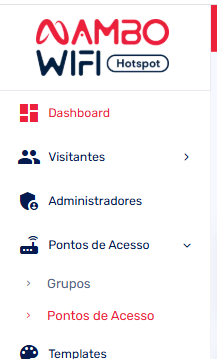
No menu, clique em Pontos de Acesso -> Pontos de Acesso, filtre pelo ponto de acesso desejado e verifique se ele está com padrão NetProtection (identificador com valor: SICREDI-xxxx-xxxx-xxxx).
Iremos inativar esse ponto de acesso. Clique no ícone do lápis(editar), e altere o valor do campo status para inativo.
OBS: ENVIE O <span dir="ltr" style="color: rgb(0, 0, 0); font-family: -apple-system, BlinkMacSystemFont, " segoe="" ui",="" roboto,="" "helvetica="" neue",="" arial,="" sans-serif;="" font-size:="" 13px;="" font-weight:="" 400;="" text-align:="" left;="" text-indent:="" 0px;="" display:="" inline="" !important;"="">identificador com valor: SICREDI-xxxx-xxxx-xxxx para a equipe Mambo em suporte@mambowifi.com ou por telefone, precisamos saber essa licença quando ela for inativada.
Clique em Salvar.
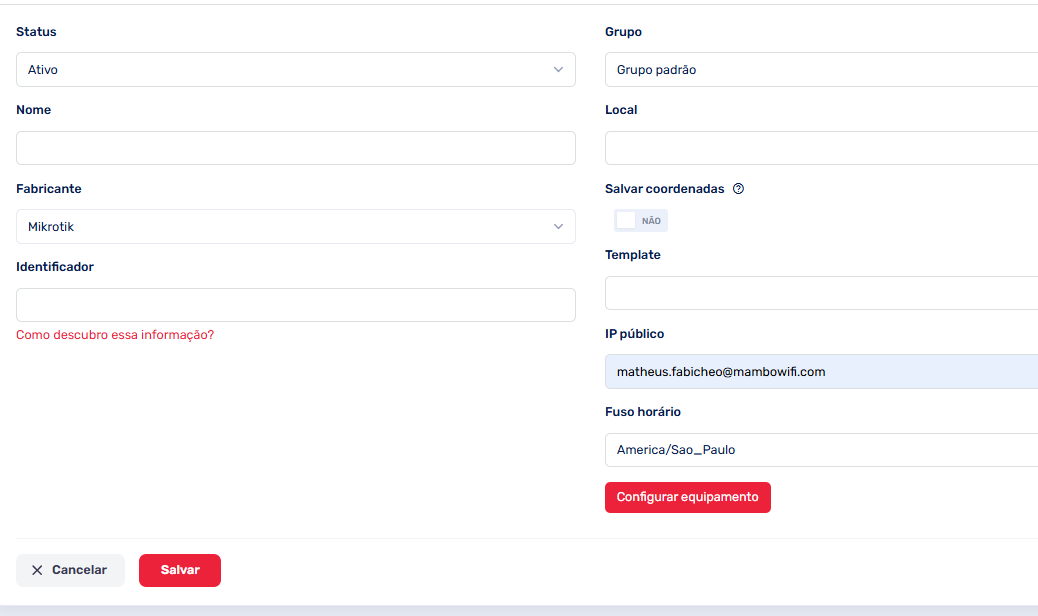
11. Na tela de listagem de pontos de acesso, clique no botão Cadastrar.
- Preencha o nome do ponto de acesso conforme desejar.
- No campo Fabricante, selecione a opção Mikrotik.
- No campo Identificador você deverá informar o Mac Address do roteador (<span data-identifyelement="483" style="color: rgb(0, 0, 0); font-family: -apple-system, BlinkMacSystemFont, " segoe="" ui",="" roboto,="" "helvetica="" neue",="" arial,="" sans-serif;="" font-size:="" 13px;="" font-weight:="" 400;="" text-align:="" left;="" text-indent:="" 0px;="" display:="" inline="" !important;"="">salvo no passo 6)
Para mais detalhes de como cadastrar um novo ponto de acesso clique aqui!

Clique em Salvar
<p data-identifyelement="579" style="box-sizing: border-box; margin-bottom: 0px; margin-left: 0px; font-size: 13px; line-height: 18px; word-break: normal; overflow-wrap: break-word; color: rgb(24, 50, 71); font-family: -apple-system, BlinkMacSystemFont, " segoe="" ui",="" roboto,="" "helvetica="" neue",="" arial,="" sans-serif;="" font-weight:="" 400;="" text-align:="" start;="" text-indent:="" 0px;"=""><p data-identifyelement="582" style="box-sizing: border-box; margin-bottom: 0px; margin-left: 0px; font-size: 13px; line-height: 18px; word-break: normal; overflow-wrap: break-word; color: rgb(24, 50, 71); font-family: -apple-system, BlinkMacSystemFont, " segoe="" ui",="" roboto,="" "helvetica="" neue",="" arial,="" sans-serif;="" font-weight:="" 400;="" text-align:="" start;="" text-indent:="" 0px;"="">Pronto, seu equipamento está atualizado e pronto para uso! <p data-identifyelement="582" style="box-sizing: border-box; margin-bottom: 0px; margin-left: 0px; font-size: 13px; line-height: 18px; word-break: normal; overflow-wrap: break-word; color: rgb(24, 50, 71); font-family: -apple-system, BlinkMacSystemFont, " segoe="" ui",="" roboto,="" "helvetica="" neue",="" arial,="" sans-serif;="" font-weight:="" 400;="" text-align:="" start;="" text-indent:="" 0px;"="">
<p data-identifyelement="464" style="box-sizing: border-box; margin-bottom: 0px; margin-left: 0px; font-size: 13px; line-height: 18px; word-break: normal; overflow-wrap: break-word; color: rgb(24, 50, 71); font-family: -apple-system, BlinkMacSystemFont, " segoe="" ui",="" roboto,="" "helvetica="" neue",="" arial,="" sans-serif;="" font-weight:="" 400;="" text-align:="" start;="" text-indent:="" 0px;"="">Precisa de ajuda? <p data-identifyelement="582" style="box-sizing: border-box; margin-bottom: 0px; margin-left: 0px; font-size: 13px; line-height: 18px; word-break: normal; overflow-wrap: break-word; color: rgb(24, 50, 71); font-family: -apple-system, BlinkMacSystemFont, " segoe="" ui",="" roboto,="" "helvetica="" neue",="" arial,="" sans-serif;="" font-weight:="" 400;="" text-align:="" start;="" text-indent:="" 0px;"="">
Caso tenha alguma dúvida ou dificuldades envie um email para suporte@mambowifi.com